Daily job alerts in South Africa: get hired faster

The fastest way to get reliable daily job alerts in South Africa is to combine a WhatsApp alert service with at least one job board and direct monitoring of company career pages. That trio works because WhatsApp reaches you instantly without heavy data use, a job board catches roles from larger employers, and career pages often post vacancies before any aggregator sees them. Start today: join the Findjobsza WhatsApp alert and set one email alert on a job board you already use.
Key takeaways
The most reliable daily job alert strategy in South Africa combines a WhatsApp service like Findjobsza with one job board email digest and direct monitoring of target employer career pages.
| Point | Details |
|---|---|
| Lead with WhatsApp | WhatsApp alerts reach you instantly at low data cost and are the fastest channel for local and SME roles. |
| Tune your criteria | Set specific job title variations, a location radius, and job type filters to keep daily alerts relevant and manageable. |
| Verify before applying | Cross-check every listing on the employer’s official site; legitimate employers never charge application fees. |
| Apply within two hours | Early applications on high-demand roles are seen before recruiters close the search. |
| Findjobsza | Delivers free daily WhatsApp job alerts across South Africa with no CV upload or sign-up required. |
Table of Contents
- How daily job alert notifications actually work
- Best channels for daily job alerts in South Africa
- How to set up daily alerts on the top services
- How to tune your alert criteria so you get useful results
- How to spot scams and verify listings in South Africa
- Why WhatsApp works so well for job alerts in South Africa
- Turn daily alerts into actual interviews
- A practical daily routine that actually works
- Findjobsza delivers daily job alerts without the friction
- Sources
- FAQ
How daily job alert notifications actually work
Job alert systems push new postings to you through one of five delivery types, and the differences matter more than most people realise.
- Push notifications (apps): Arrive the moment a matching role is posted. Fast, but noisy if your criteria are too broad.
- WhatsApp and SMS alerts: Delivered directly to your phone, often as a morning batch or as posts go live. Low data cost, high open rate, and no app download needed.
- Email digests: Sent once daily or weekly. Good for reviewing at your own pace, but a role posted at 8 AM may only reach you at 6 PM.
- RSS feeds: Automated feeds from job boards that update continuously. Useful if you use a feed reader, but requires a little technical setup.
- Monitored company career pages: You visit manually or use a page-change monitoring tool. Slow unless automated, but catches roles that never appear on aggregators.
Timing shapes your chances. An instant push notification gives you a head start over someone who checks email once a day. A daily digest is easier to manage but means you are always a few hours behind. For high-competition roles, speed wins.
Pro Tip: Set WhatsApp or push alerts for your top two job categories and use a daily email digest for broader searches. That way you get speed where it counts and a manageable summary for everything else.
Best channels for daily job alerts in South Africa
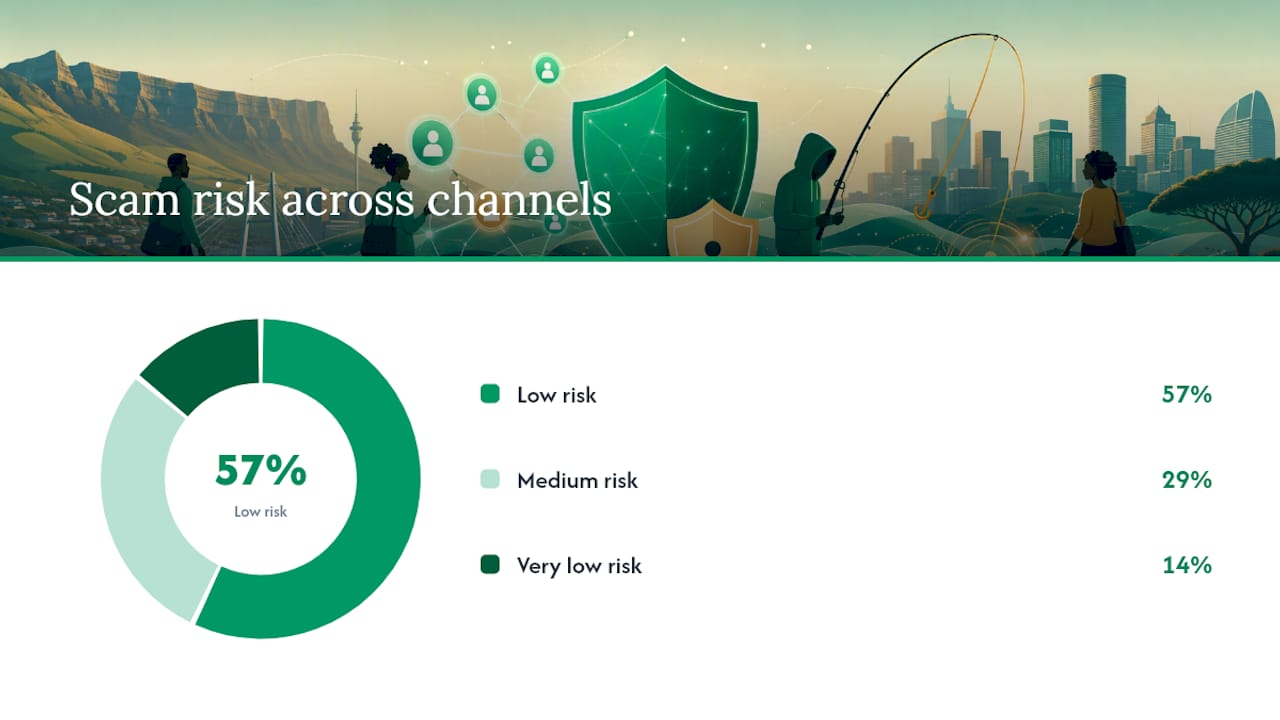
Not every channel suits every job seeker. Here is how the main options compare on reach, cost, and scam risk.
| Channel | Best for | Cost | Scam risk | Setup effort |
|---|---|---|---|---|
| Findjobsza WhatsApp alerts | All sectors, daily morning updates | Free | Low (no CV/sign-up required) | Very low |
| LinkedIn job alerts | Professional and corporate roles | Free (premium optional) | Low | Low |
| Indeed South Africa | Broad search, entry-level to mid-level | Free | Medium | Low |
| PNet | Corporate, IT, finance roles | Free (premium listings exist) | Low | Low |
| Community WhatsApp groups | Local, informal, and SME roles | Free | Medium (admin-dependent) | Low |
| Government vacancy sites (DPSA) | Public sector, government posts | Free | Very low | Medium |
| Recruitment agency newsletters | Specialist and executive roles | Free | Low | Low |
A few notes worth adding. Community WhatsApp groups are often the first place small businesses post roles when they cannot afford a large recruitment campaign, as local reporting confirms. Government sites like the DPSA vacancy circular are authoritative but update weekly, not daily. Recruitment agency newsletters are underused: sign up directly with three agencies in your sector and you get curated alerts with no extra effort.
How to set up daily alerts on the top services
Follow these steps to get new job postings arriving before breakfast.
-
Findjobsza WhatsApp alerts: Visit Findjobsza and follow the WhatsApp join link on the homepage. No CV upload, no account creation. You will receive a morning batch of new listings every day.
-
LinkedIn job alerts: Go to linkedin.com/jobs, run a search using your job title and location, then click “Set alert” on the results page. Choose daily frequency. LinkedIn sends an email digest each morning with new matches.
-
Indeed South Africa: Search on za.indeed.com, scroll to the bottom of the results, and click “Get new jobs for this search by email.” Set frequency to daily. Indeed also has an app with push notifications if you prefer that.
-
PNet: Create a free account at pnet.co.za, save a search, and enable email alerts. PNet lets you set multiple saved searches, which is useful for covering different job titles or cities.
-
Company career pages: Identify five to ten target employers. Bookmark their careers pages and check them every Monday and Thursday, or use a free page-monitoring tool like Visualping to alert you when the page changes. Career guides confirm that many roles appear on employer sites before any aggregator picks them up.
-
Government vacancies (DPSA): Visit dpsa.gov.za and download the weekly vacancy circular every Friday. Subscribe to the DPSA newsletter if available, or set a calendar reminder to check manually.
-
Browser notification settings: On Chrome or Edge, go to Settings > Privacy and Security > Notifications. Allow notifications only from job boards you trust. For cookie and notification management in Edge, Microsoft’s support page walks you through the exact steps.
How to tune your alert criteria so you get useful results
Broad alerts produce noise. Narrow ones miss opportunities. The goal is a daily list of ten to twenty roles you would genuinely apply for.
Start with your job title. Use the exact title you want plus two common variations. An IT support technician might set three separate alerts: “IT support technician,” “helpdesk technician,” and “desktop support.” On LinkedIn and Indeed, you can use basic boolean logic: "IT support" OR "helpdesk" NOT "senior" keeps results entry-level if that is where you are.
Location matters more than people expect. Setting a radius of 30 km around your city centre usually covers commutable roles without flooding you with listings from other provinces. For remote jobs, set location to “South Africa” or “remote” and remove the radius entirely.
Job type filters cut noise fast. Separate your permanent-role alerts from contract and learnership alerts. Business Day’s careers reporting recommends staying open to learnerships and temporary roles as a genuine path into full employment, so keep at least one alert set to include them.
Pro Tip: After three days, count how many alerts you are actually opening. If you are ignoring more than half, tighten the keywords. If you are seeing fewer than five roles a day, broaden the title variations or add a second city.
How to spot scams and verify listings in South Africa
South Africa’s job market has a real fraud problem. These are the red flags that should stop you in your tracks.
- Any request for money before you start work. Legitimate employers do not charge application fees, registration fees, or training deposits. Platforms like Spaan, which launched with ID verification and a reported R30 identity-check fee, charge for identity verification of the employer, not the applicant. That is a different thing entirely.
- Vague job descriptions with unusually high salaries. “Earn R25,000 from home, no experience needed” is a scam template.
- Contact via personal WhatsApp numbers with no company name. Legitimate recruiters use branded email addresses and named company accounts.
- Pressure to respond within hours. Urgency is a manipulation tactic.
- Requests for ID, banking details, or personal photos before an interview. No legitimate employer needs your bank account number at the application stage.
Verification checklist before you apply:
- Search the company name on the CIPC website (cipc.co.za) to confirm it is registered.
- Find the company’s official website independently (not from the job ad link) and check whether the vacancy appears on their careers page.
- Confirm the recruiter’s email domain matches the company’s official domain.
- If a WhatsApp post claims to be from a known employer, call the company’s switchboard to verify.
- Report suspicious listings to the South African Police Service (SAPS) or the Department of Employment and Labour.
Why WhatsApp works so well for job alerts in South Africa
WhatsApp is not just convenient here. It is structurally better suited to South Africa’s job market than email or desktop notifications for most job seekers.
Community WhatsApp groups give local businesses a free, immediate channel to post roles, and group administrators actively vet posts to reduce spam and scams, as documented by The Citizen. That vetting layer is informal but real. A well-run group admin removes suspicious posts faster than a job board’s moderation team.
The data-cost argument is equally practical. Platforms like eJoobi use WhatsApp, SMS, and USSD to match candidates without requiring a smartphone with full data access. Startups like BitTalent are building AI-driven matching delivered through the same low-data channels, which shows where the market is heading. WhatsApp messages consume a fraction of the data a job board page does, and they arrive even on basic Android devices.
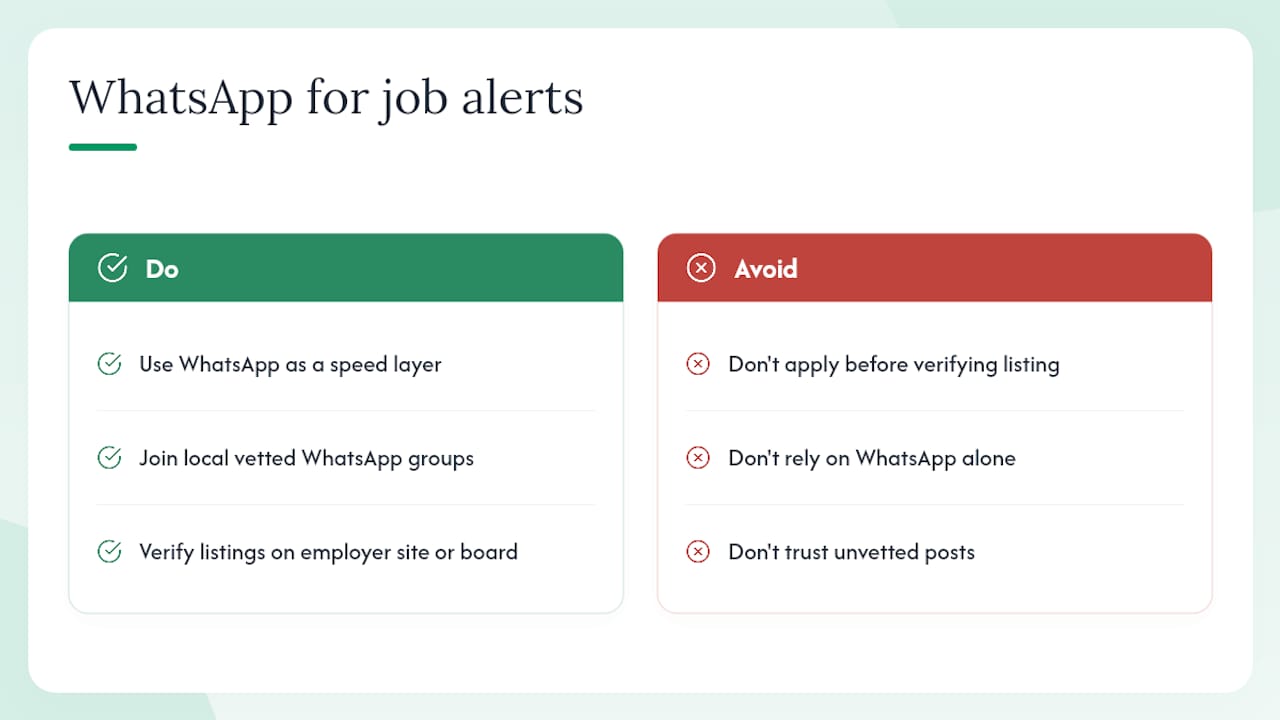
The catch is volume. WhatsApp groups move fast, and a post from 7 AM may be buried by noon. That is why WhatsApp works best as your speed layer, not your only layer.
Pro Tip: Use WhatsApp for speed and first-mover advantage. Cross-check every WhatsApp listing against the employer’s official website or a major job board before submitting anything. The two minutes it takes to verify could save you from a scam.
Turn daily alerts into actual interviews
Getting the alert is step one. Converting it into an interview requires a system.
-
Respond within two hours of receiving an alert. For high-demand roles, applications submitted in the first few hours have a measurably better chance of being seen before a recruiter closes the search.
-
Keep a base CV and three cover letter templates ready. One template for corporate roles, one for SMEs, one for entry-level or learnership applications. Use ResumeMint’s tailoring guide to adapt each one in under five minutes per application.
-
Prepare a required-documents folder on your phone. ID copy, matric certificate, latest payslip, and any sector-specific certificates. Attach from there rather than hunting each time.
-
Track every application. A simple spreadsheet with columns for company, role, date applied, contact name, and follow-up date is enough. Set a reminder to follow up seven days after applying if you have heard nothing.
-
Follow up once, briefly. A short email or LinkedIn message: “I applied for [role] on [date] and wanted to confirm receipt. I am available for an interview at your convenience.” That is it. No more than one follow-up per application.
Combining alerts with active networking multiplies your chances. Alerts push opportunities to you; hiring often happens through people who already know your name.
A practical daily routine that actually works
Most job seekers check alerts sporadically. The ones who move fastest treat it like a 20-minute morning task.
Open WhatsApp first. Scan the morning batch from Findjobsza and any community groups you follow. Flag anything worth applying for with a star or a saved message. This takes five minutes if your criteria are already set.
Then open your email digest from LinkedIn or your job board of choice. You will see roles posted since yesterday afternoon. Add any new matches to your application tracker.
Spend the remaining ten to fifteen minutes on applications. Two or three targeted applications done well beat ten rushed ones. Use your prepared templates, adjust the opening paragraph for each role, attach your documents folder, and send.
Once a week, check the DPSA vacancy circular and the careers pages of your top five target employers directly. Some of the best admin roles and teaching positions appear on employer sites days before they reach any aggregator.
Findjobsza delivers daily job alerts without the friction
Most job boards make you create an account, upload a CV, and navigate three pages of settings before a single alert arrives. Findjobsza skips all of that.
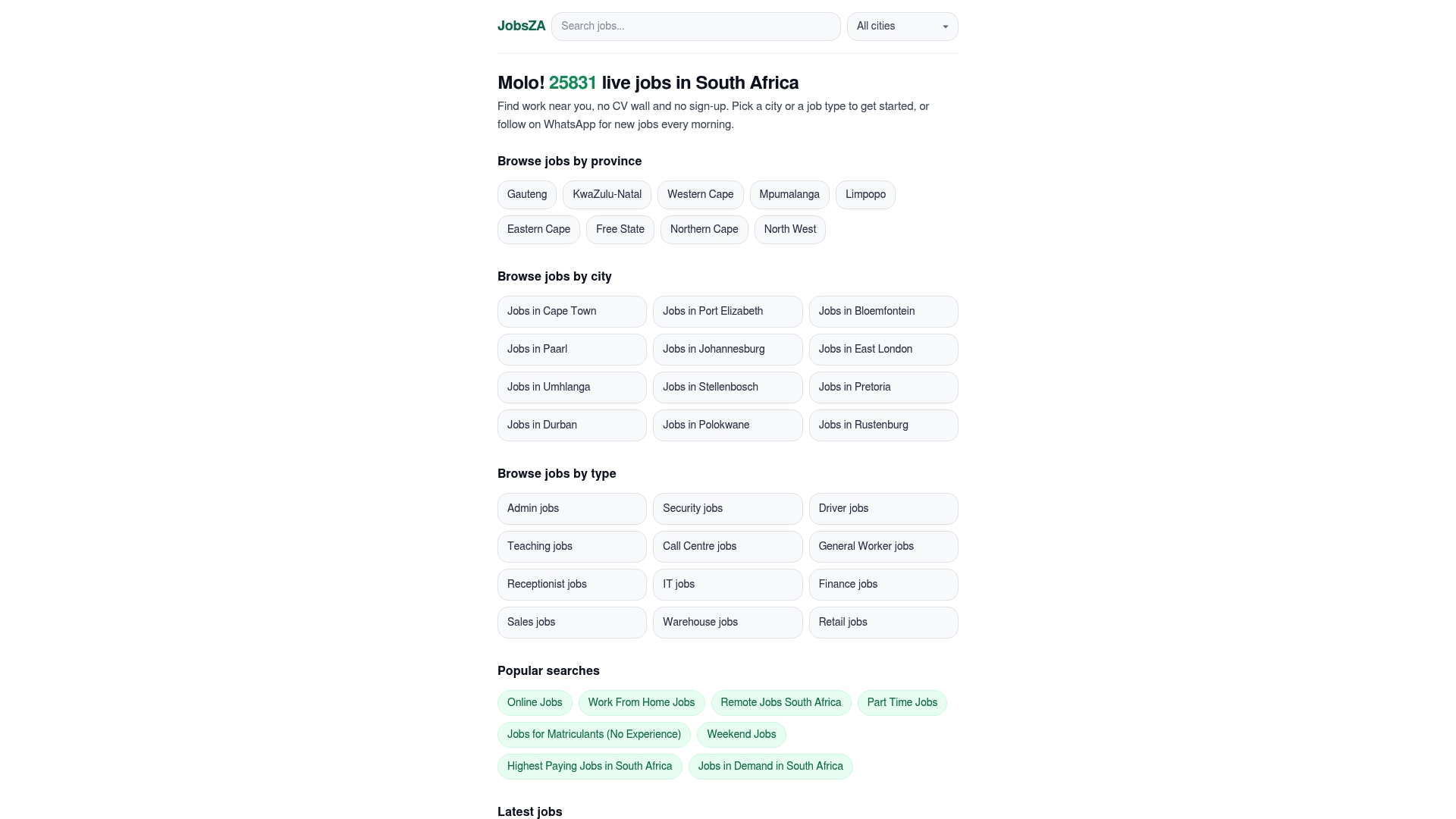
The platform sends a fresh batch of South African job listings to WhatsApp every morning, covering full-time, part-time, freelance, and entry-level roles across every major sector. No registration, no CV upload, no waiting. You browse by city or job type, and you apply directly. For readers who want targeted alerts, the jobs in demand page shows which categories are hiring most actively right now, and dedicated pages for IT roles and remote work let you go straight to the listings that match your skills. Visit findjobsza.co.za, join the WhatsApp alert, and your first batch of new listings arrives tomorrow morning.
Sources
The following sources were used to build this guide. They are worth bookmarking for ongoing reference.
- These WhatsApp groups are offering hope to SA job seekers | The Citizen
- How to find work as a young South African | Business Day
- Delete cookies in Microsoft Edge - Microsoft Support
- A practical guide to finding employment in South Africa in 2026 | CareerC-SA
FAQ
Are daily job alerts in South Africa free?
Yes. WhatsApp alerts from Findjobsza, email alerts on LinkedIn, Indeed, and PNet are all free. Some platforms charge employers to post or offer premium placement, but job seekers pay nothing to subscribe or apply.
How do I set job alerts on LinkedIn?
Run a job search on linkedin.com/jobs, then click “Set alert” on the results page and choose daily frequency. LinkedIn sends a morning email digest with new matches.
How can I tell if a WhatsApp job alert is a scam?
Any listing that asks for money before you start work is fraudulent. Cross-check the role on the employer’s official website and confirm the recruiter’s email matches the company’s domain before sharing any personal documents.
How often should I check my daily alerts?
Once each morning is enough if your criteria are well-tuned. Spend five minutes on WhatsApp, ten minutes on your email digest, and the rest of your allocated time on applications. Checking more often rarely adds value and creates unnecessary distraction.
Do some jobs appear on employer sites before job boards?
Yes. Career guides confirm that many roles are posted on company career pages before aggregators pick them up. Monitoring five to ten target employer pages directly, alongside your standard alerts, catches those early listings.